Amazon Selling Partner application

Your Amazon accounts, read and reported every morning.

Ecommerceville Stock Monitor connects to a seller account, reads its inventory, listings, orders and advertising through Amazon’s own APIs, and turns them into a daily picture of what needs attention and the reports that explain the month. Read-only throughout.

  • Read-only access. Nothing is created, edited or deleted in a seller’s account.
  • No buyer personal information. No names, addresses, contact details or payment data.
  • Stored in the European Union (Paris). One database, one region, named sub-processors.
  • Revocable at any time from Seller Central, without asking us first.
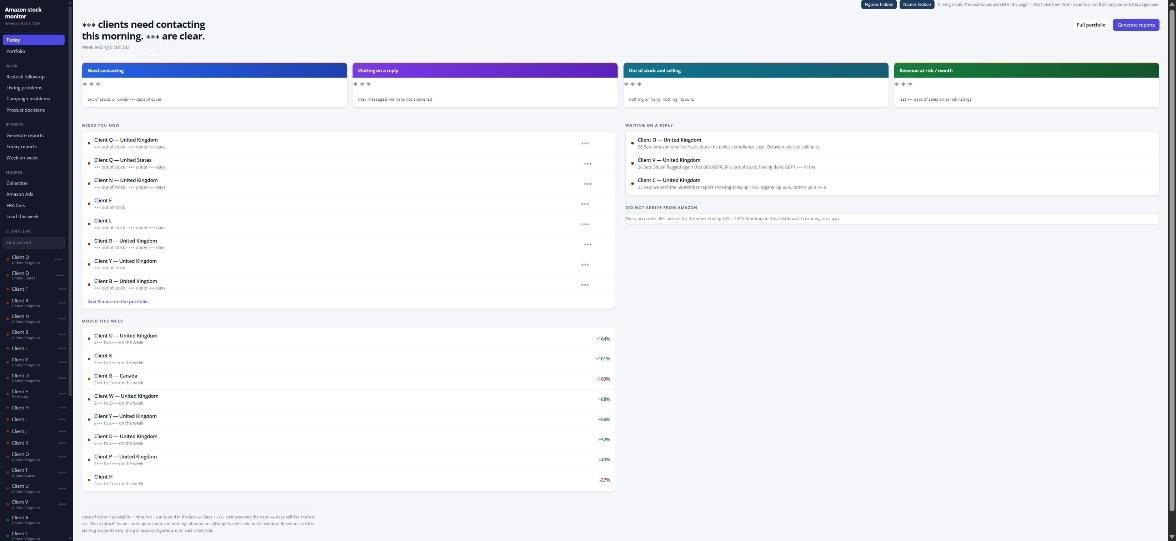
The daily view: accounts that need contacting, accounts waiting on a reply, and the week's movements.

The daily view. Captured with the application’s privacy mode on, so account names and figures are masked — this is a real screen, not a mock-up.

What it does

Four questions, answered the same way every morning.

Collection runs overnight. By the time anyone opens it, every connected account has been read, and the day opens on what changed rather than on an empty search box.

Stock position

What is in Amazon’s warehouses, what is inbound, and how many days of cover each listing has at its current rate of sale. Listings are ordered by what runs out first, so a restock decision does not depend on anyone reading to the bottom of a table.

Listing problems

Listings that have gone inactive, suppressed, stranded or unbuyable, with the date each one changed. A listing that stopped selling because Amazon switched it off looks identical to one that stopped selling because demand fell, until something separates them.

Sales and traffic

Units and revenue per product and per day, alongside sessions, page views, conversion rate and Buy Box share, compared week against week. The emphasis is movement rather than totals: what grew, what fell, and by how much against the same stretch of the previous week.

Advertising

Spend, attributed sales, ACOS, TACOS and campaign budgets across Sponsored Products, Sponsored Brands and Sponsored Display — including campaigns that are out of budget before the day ends, and campaigns spending more than they return.

The work list

It does not stop at a number. It says what to do about it.

A figure that has moved is only useful if somebody acts on it, so the application keeps four standing lists and carries each item until it is closed.

  • Restock follow-up. Every product close enough to running out to need a decision, with its cover, its inbound shipment and whether it has already been raised. Items stay on the list until stock arrives or somebody marks them handled, so nothing is chased twice or forgotten once.
  • Listing problems. Every listing Amazon has switched off or made unbuyable, grouped by account, with the day it changed and whether it has been reported.
  • Campaign problems. Campaigns out of budget, campaigns spending with nothing attributed back, and campaigns below a workable return — each with the spend at stake.
  • Product decisions. Products that have stopped moving, products worth more stock, and products whose fees have changed enough to alter whether they are worth selling.

Notes and flags attach to the account and the product, so the history of what was raised, when, and what happened next stays with the thing it concerns.

Reports

Written to be sent, not exported and tidied up.

Monthly

A finished month against the month before it: sales, organic sales, advertising sales, orders and profitability, per product and in total, with a written summary that can go to the account owner as it stands.

Month to date and week on week

The same figures mid-month, and a week-against-week view for the shorter cycle — what grew, what fell, and which products moved the total.

It refuses to guess

If a month is missing days — a broken connection, a report Amazon has not published yet — the comparison is withheld and the report says which side is short and why, instead of printing a confident percentage drawn from half a month.

Collection

If a day is missing, it says so.

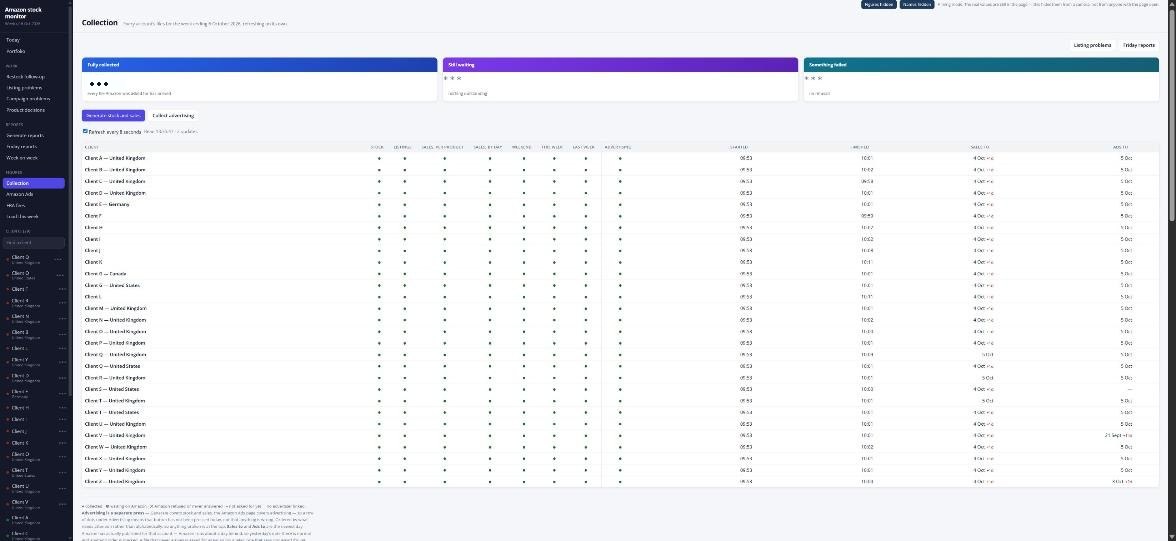
Every connected account, every morning, with the state of each collection on one screen. A report that quietly stopped arriving is the failure that costs money, so the application tracks what it asked Amazon for and what came back, rather than assuming.

The collection screen, listing every connected account and the state of each day's data pull.

Also captured with privacy mode on. Account names are replaced and every figure is masked.

What it reads

Amazon’s own reports, and nothing else.

  • Selling data through the Selling Partner API: inventory and restock, merchant listings, sales and traffic by product and by day, order summaries, and fee estimates.
  • Advertising data through the Amazon Advertising API, for advertisers that have granted access: campaign spend, attributed sales, clicks, impressions and budgets.
  • Nothing typed in by hand that Amazon already publishes. Figures in a report can be traced back to the Amazon report they came from and the day it was collected.
Dailycollection, every morning
Read‑onlyno write access is requested
EUwhere every record is stored
36 monthsof history kept, then deleted

How it connects

The seller authorises it. Nobody here touches a password.

  1. The seller authorises

    Connecting is done by the seller, from their own Seller Central account, through Amazon’s standard authorisation flow. No Seller Central password is seen, entered or held by the application or by anyone operating it.

  2. It reads published reports

    Amazon issues a token scoped to the report types the application actually reads. Collection runs on a schedule from then on; no further action is needed from the seller.

  3. Access ends when they say so

    Authorisation can be withdrawn at any time from Seller Central, under Apps and Services → Manage Your Apps. Access ends immediately, and data is deleted on the timetable set out in the privacy policy.

Access is read-only throughout. The application requests reports and reads them. It does not create, edit or delete listings, change prices, alter inventory, place orders or make changes to campaigns.

What it does not collect

No buyer personal information. None of it, anywhere.

The application stores nothing that identifies an account’s customers — no buyer names, delivery addresses, email addresses, telephone numbers or payment details — and it asks Amazon for none of the restricted permissions that would make those fields visible to it.

One of the reports it downloads, the order report, is capable of carrying buyer details for applications that hold those permissions. This one reads five columns from it — the date, the order and item status, the quantity, the item price and the currency — and keeps only the daily totals that come out of them. Every figure in every report works at the level of products, days, campaigns and totals.

What the application does hold, where it is held, how long it is kept and who else touches it are set out in full in the privacy policy.

How it is protected

A seller’s data is the whole of what this holds.

Encryption and isolation

TLS in transit and encryption at rest. Row-level security is enabled on every table holding collected data, and the anonymous and public database roles have no access to any of it.

Named accounts, two steps

Every person has their own account with a role, a hashed password and a time-based code from an authenticator app. No shared logins, and automatic lockout after repeated failed sign-ins.

Credentials and audit

Amazon refresh tokens are held as server-side secrets, never exposed to a browser, written into a report or logged. Significant actions are recorded with the person, the account and the time.

A written incident response plan with a named contact is reviewed every six months. Any incident touching Amazon data or credentials is reported to Amazon within 24 hours of detection. The full account is in the privacy policy.

Getting in touch

A person answers, within one working day.

Support
info@ecommerceville.com — see the support page for what to include and how long a reply takes.
Telephone
+44 7845 910011 — Monday to Friday, 9am to 5.30pm UK time.
Privacy and data requests
info@ecommerceville.com
Where data is stored
the European Union (Paris)